AI Tools (5318)
Description Generator (19)
FREE- AI Description Generator
- Product Description Generator
- Outfit Description Generator
- Product Description Writer
- AI Business Description Generator
Name Generator (50)
FREE- Product Name Generator
- Restaurant Name Generator
- Project Name Generator
- Cafe Name Generator
- Coffee Shop Name Generator
Upload Your Saree Photo
Pick a model who looks like your customers.
Full body shows the whole drape and border; knee-up shows the pallu and blouse closer.
White or light grey for marketplace listings (Meesho, Myntra, Amazon, Daraz); the festive scenes suit Instagram and ads.
The options below are optional and already filled in.
Preview
Preview
Your image will appear here
Upload an image and click Generate to see your AI-enhanced preview
AI Saree Model Generator: See Your Saree Draped on a Model
Upload a saree photo and see it draped on a realistic model, pallu and border kept.
Overview
A folded saree shows its color and border, but a buyer wants to see how the pallu falls and how the pleats sit before ordering. Draping one saree on a model for every listing takes a stylist, a model and a day in a studio. This tool takes the photo you already have, folded, spread out or on a hanger, and drapes the same saree on an AI model. You choose the drape (Nivi, Gujarati seedha pallu or Bengali), the blouse, the model and the backdrop, from a white studio for marketplace listings to a haveli courtyard or a festive diya scene for Instagram.
- •First photo free with a free account
- •Silk, Banarasi, Kanjeevaram, cotton, georgette, chiffon and printed sarees
- •Nivi, pinned or open pallu, Gujarati seedha pallu and Bengali drapes
- •Pallu, border, zari and motifs kept from your photo
- •White studio for listings, festive scenes for social posts
- •Adult AI models only
Example Results
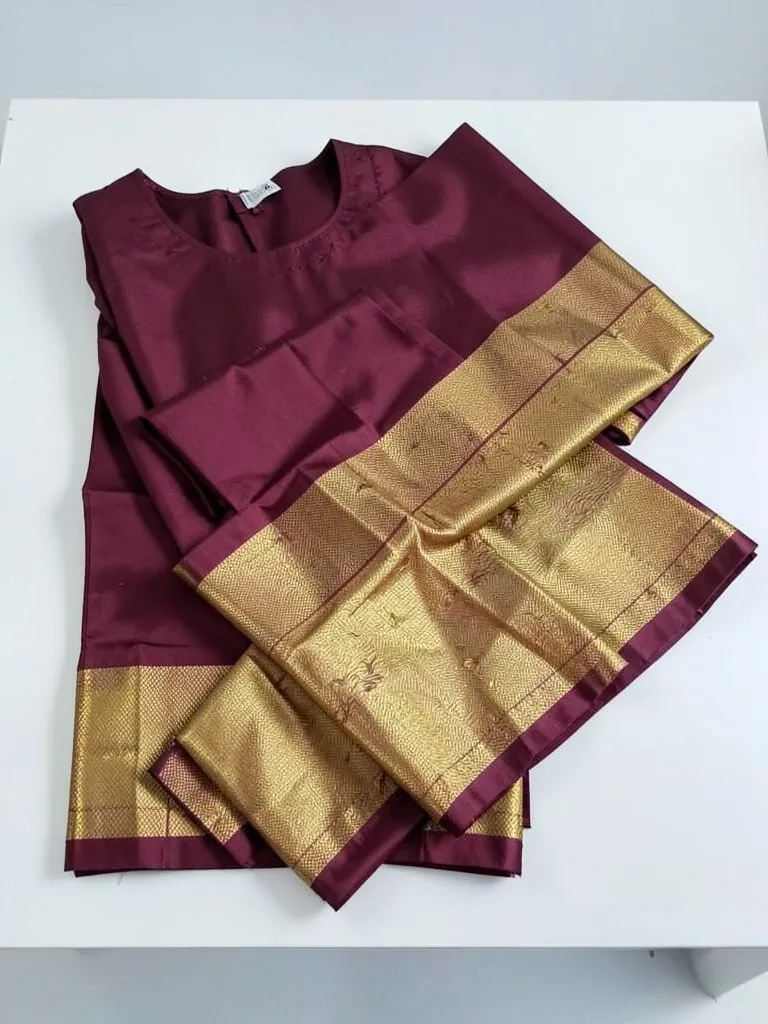
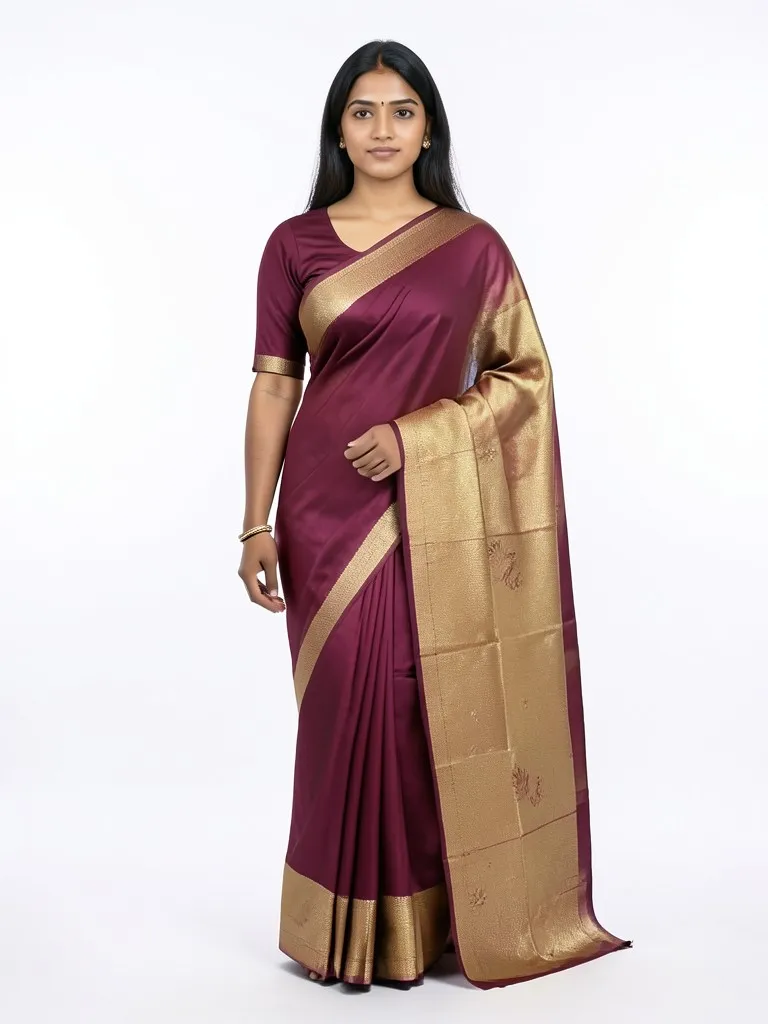
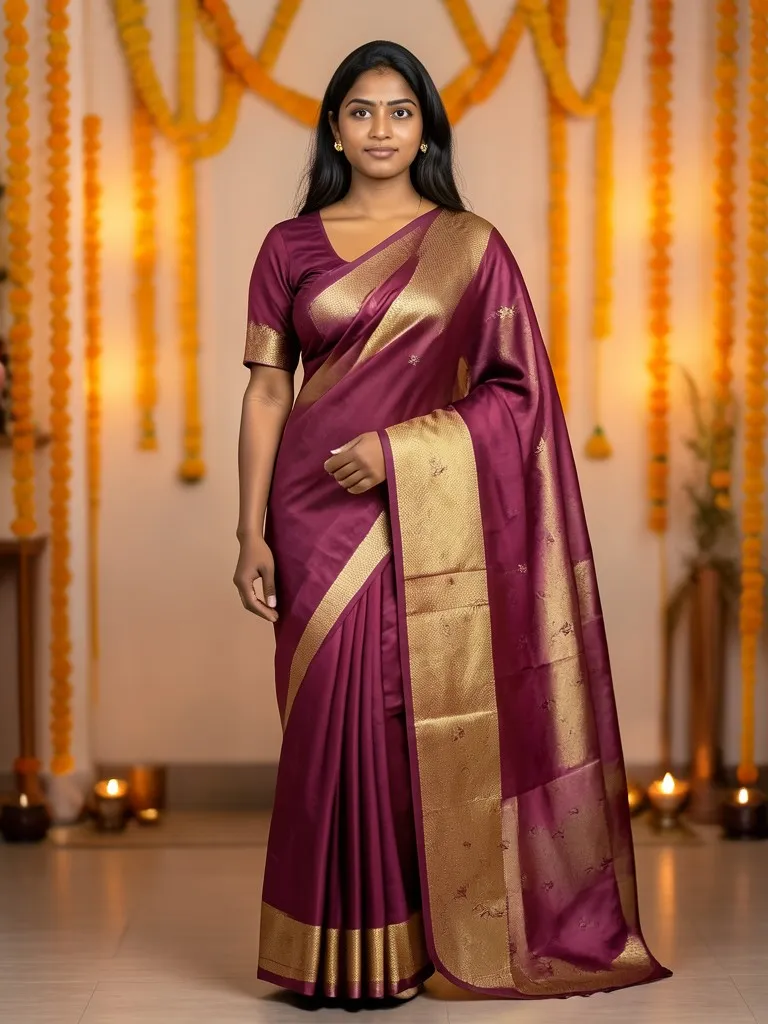
Features
Real drapes
Front pleats, a pallu over the shoulder and a hem at the ankles, in the drape style you pick.
Your saree kept
Base color, border, pallu design, zari, motifs and sheen are copied from your photo.
Models for your market
Fair, medium and deep brown skin, plus size and a late-40s model for festive and wedding wear.
Listing or festive look
White and grey studio shots for marketplaces, marigold, haveli and wedding scenes for Instagram.
How It Works
Photograph the saree
Spread it out or fold it so the body, the border and the pallu are all visible, in daylight and in focus.
Pick the drape and blouse
Nivi is the everyday choice; use Gujarati or Bengali if your customers wear it that way.
Choose the model and scene
Skin tone, age and figure, then a white studio, a haveli courtyard, a festive or a wedding backdrop.
Generate and compare
Check the pallu and border against the real saree, then download for your listing.
Use Cases
Meesho, Myntra and Amazon sellers
Every saree needs an on-model main image, and new designs arrive every week.
Key Benefits:
- •On-model shot the same day
- •White backgrounds for listings
- •One model across a collection
Instagram and WhatsApp boutiques
Post a new saree draped, not folded, and answer the "how does it look worn?" question before it is asked.
Key Benefits:
- •Festive and wedding scenes
- •Several looks per saree
- •No studio booking
Handloom weavers and small labels
Show a handwoven saree worn without paying for a model shoot for each piece.
Key Benefits:
- •Border and pallu shown worn
- •Works from phone photos
- •Low cost per design
Frequently Asked Questions
The saree on its own, spread out or neatly folded so the body, border and pallu all show, in daylight and in focus. A photo of the saree on a mannequin also works. Do not upload a photo of a person wearing it.
The Nivi drape (with the pallu pinned in pleats or left open), the Gujarati seedha pallu and the Bengali drape. Regional drapes like Nauvari or Coorgi are not in the list yet and may not come out right.
The AI is told to keep the border, pallu design, zari and motifs, and simple to medium designs come out close. Very fine woven patterns, like dense Banarasi buttis, can be simplified, so compare with the real saree before you publish.
Yes. If your photo shows the blouse piece it uses that; otherwise it adds a plain blouse in a matching color. You can pick the sleeve length.
No. Every model is generated by AI and is an adult. No real person's face or body is used, so you do not need model releases.
Yes, a free account. Upload a garment and press the button, then sign up free to see your first photo. After that, more photos use credits from your free account or a plan; see the pricing page.
Yes. You can pick from five model looks, including a 30s plus-size model and a late-40s model, and from six backgrounds: white, light grey or beige studio, a haveli courtyard, a festive marigold and diya setting, or a wedding venue.
Yes. Pick Back view as the pose to show the back of the drape, Holding the fabric to show the weave, or Walking to show how the pallu falls. Back details are not in your photo, so compare them with the real saree.
Yes. Framing has three choices: full body, knee-up and waist-up. Use full body for the drape and waist-up when the border or blouse is the selling point.
Each photo uses 1 credit. New accounts start with free credits, and plans add more; see the pricing page.
AI fashion models by type
Pick the model that fits your customer: men, women, plus size, petite, over 50, Asian, and models for saree, abaya or evening wear.
- AI Male Model
- AI Men's Fashion Photography
- AI Female Model Generator
- AI Asian Model
- AI Asian Male Model
- Plus Size AI Model
- AI Petite Model
- AI Models Over 50
- AI T-Shirt Model
- AI Evening Gown Model
- AI Kurti Model
- AI Lehenga Model
- AI Abaya Model
- AI Hijab Model
- AI Hair Accessories Model